Wrinkled, crooked, bubbled, peeling, or missing labels usually result from a mismatch between the label, package, applicator setup, and line conditions—not from one isolated machine fault. The fastest way to resolve food packaging label application problems is to sort defects by symptom, inspect the application point first, and change one variable at a time.
Start by separating an application defect from a printing or coding defect. A label can be firmly and accurately applied yet still have faint print, poor barcode contrast, or an unreadable date code. Conversely, a perfectly printed label may be skewed, wrinkled, or partly detached. Treat these as separate failure paths so the team does not adjust the labeling machine to solve a printer problem.
Begin with a controlled check
Before making adjustments, collect a short sample of rejected packs and note whether the defect occurs continuously, after a roll change, at startup, at one speed, or only on a certain container size. Compare defective packs with acceptable packs from the same run.
Use this order of checks:
- Confirm the defect. Is the label landing in the wrong position, deforming during application, failing to bond, or not dispensing at all?
- Check the package. Confirm container dimensions, orientation, surface condition, stability, and spacing.
- Check the label roll. Verify label material, adhesive, die-cut quality, roll direction, storage condition, and liner condition.
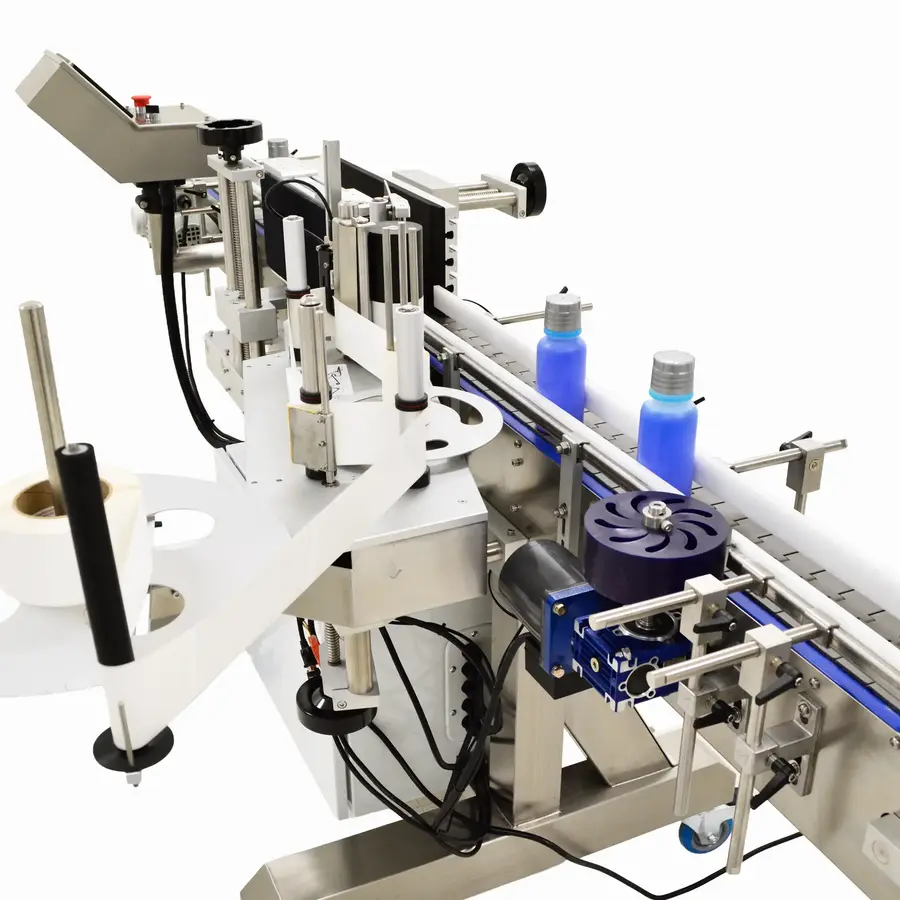
- Check the applicator. Inspect web path, guides, peel edge, rollers, sensors, and wipe-down components for contamination, wear, or misalignment.
- Check motion and timing. Verify conveyor speed, container spacing, product detection, label-feed timing, and speed synchronization.
- Make one adjustment and re-sample. Multiple simultaneous changes can conceal the real cause.
Symptom-to-cause troubleshooting guide
| Symptom | Likely cause categories | First checks | Typical line fix |
|---|---|---|---|
| Label applies crooked | Container instability, guide-rail position, web wandering, sensor timing, applicator alignment | Container tracking, label path, tension, product sensor repeatability | Stabilize the container, align guides and applicator, correct web tracking and timing |
| Label wrinkles or bubbles | Uneven contact, trapped air, excessive tension, unsuitable label stiffness, poor conformability | Wipe-down roller condition, pressure, container shape, web tension | Adjust contact pressure gradually, replace worn rollers, review label construction |
| Label edge lifts or peels | Contamination, adhesive/substrate mismatch, inadequate pressure, difficult curvature, cold or wet packs | Surface cleanliness, package material, adhesive specification, wipe-down contact | Correct surface condition, improve initial contact, use compatible label and adhesive |
| Label flags after application | Incomplete wrap, high memory in label stock, sharp curvature, weak adhesion at the trailing edge | Trailing-edge contact, label curl, container shape, storage history | Improve wipe-down action, review label stiffness and adhesive, correct storage |
| Labels intermittently missing | Gap sensor error, web break, poor dispensing, static, inconsistent tension, product-detection timing | Sensor setup, liner path, peel edge, static, label feed | Clean and set sensors, restore web path, control static, verify timing |
| Labels tear or stretch | Excessive tension, damaged guides, poor liner strength, misalignment, snagging at peel edge | Roller condition, tension settings, liner damage, path alignment | Remove snag points, reset tension, replace damaged components, review label stock |
Why labels skew on bottles, jars, and trays
Label skew troubleshooting should begin with the container, not the label roll. A bottle that rotates unevenly, leans against a guide rail, or enters the label station off-center can receive a consistently crooked label even when the applicator is functioning properly.
Check whether containers are stable from infeed through wipe-down. Guide rails should hold the package in a repeatable position without squeezing, scuffing, or steering it. For round containers, inspect wrap belts, wrap stations, and rollers for unequal contact or wear. For non-round packs, confirm that the orientation system and change parts match the current package.
Then inspect the label web. A web that drifts sideways as it approaches the dispense edge will change the label’s placement. Look for contaminated or worn guide rollers, incorrect roll loading, uneven unwind resistance, or excessive tension. Both loose and tight web conditions can create registration problems: loose web can wander, while excessive tension can stretch or distort material.
Finally, verify timing. The product sensor must detect each package consistently, and the controller must release the label at the correct point. If skew or placement shifts with line speed, investigate speed matching between the conveyor and the applicator rather than repeatedly moving the label head.
Why label wrinkles and air bubbles form
Label wrinkles on bottles are commonly caused by the label reaching the container without smooth, even contact. The leading edge may stick first while the rest of the label is pulled around a curved surface too quickly, trapping air or folding material.
Inspect these conditions:
- Wipe-down components: Dirty, hardened, damaged, or uneven rollers and brushes cannot press the label smoothly into place.
- Application pressure: Too little pressure can leave air gaps. Too much pressure can distort flexible containers or force a label to buckle.
- Container shape: Tapers, shoulders, sharp corners, recessed panels, seams, and changing diameters require a label construction and application method suited to the geometry.
- Label stiffness and curl: A label that has absorbed moisture, dried out, curled, or been stored poorly may not conform as intended.
- Web tension: High tension can pull or stretch a label as it separates from the liner; unstable tension can make dispensing inconsistent.
Increase or reduce wipe-down pressure in small increments, then inspect several packs after each adjustment. A rigid glass or metal container can usually tolerate a different contact setting than a flexible plastic package. Avoid treating pressure as the only answer: if the label stock or package shape is unsuitable, more pressure may worsen the result.
Why labels peel off packaging
When labels peel, identify whether the failure begins immediately after application, at the trailing edge, after handling, or later in distribution. The timing of the failure narrows the cause.
Immediate lifting often points to insufficient initial contact, contamination, excessive label curl, or a poorly adjusted wipe-down station. Pressure-sensitive adhesives depend on intimate contact with the package surface. Oil, dust, moisture, product residue, condensation, release agents, and damaged coatings can prevent that contact.
Later peeling may indicate an adhesive and substrate mismatch or environmental exposure the label was not designed to withstand. Glass, PET, HDPE, metal, coated board, flexible films, and recycled-content packaging can have very different surface characteristics. A label specification that works on one package material may fail on another, even when the artwork and dimensions are unchanged.
Check the package condition at the labeling point. Containers should be dry and free of visible residue where the label will land. If the product is chilled, warm, or moving from a humid area, verify whether condensation is present. Also confirm that the label supplier understands the package material, application conditions, and expected storage and distribution environment.
Intermittently missing labels: focus on sensors, static, and dispensing
A pressure sensitive label applicator can appear mechanically sound while missing labels intermittently. In many cases, the problem is detection or control consistency.
Inspect the label gap sensor or registration sensor for contamination and correct setup for the actual label material. Clear film labels, highly reflective stock, metallic elements, and unusual liner constructions may require a sensor method appropriate to the material. Product sensors also need a clean, repeatable target; unstable product spacing can produce inconsistent trigger timing.
Static can cause labels to cling to the liner, peel edge, rollers, guards, or nearby machine parts instead of transferring cleanly to the package. Static-related failures may become more noticeable when humidity changes or when film-based stock is used. Check whether labels are snapping, clinging, or releasing unpredictably. Any static-control equipment should be installed, maintained, and adjusted according to the equipment supplier’s instructions.
Also inspect the dispense edge. Adhesive buildup, nicks, roughness, or incorrect geometry can interfere with clean label release. Do not scrape or modify critical applicator components in a way that could damage the machine or create an unsafe condition; use the manufacturer’s approved cleaning and service procedures.
Roll changes, storage, and changeover errors
If defects begin immediately after a new roll is installed, compare the new roll with the last acceptable one. Confirm part number, roll direction, label pitch, web width, liner type, adhesive, label material, and unwind orientation. A visually similar roll can behave differently at speed.
Store label rolls in conditions recommended by the label supplier. Temperature and humidity swings can affect paper, film, adhesive, and liner behavior. Keep rolls protected from dust, damage, direct moisture, and deformation. Allow stock to stabilize in the operating area when supplier guidance calls for it.
After a package-size changeover, verify more than sensor position. Check applicator height and offset, guide-rail width, wrap-belt position, peel-edge alignment, wipe-down pressure, product sensor position, and timing settings. Change parts that are worn, incorrectly fitted, or intended for another container can cause repeated label placement errors.
Separate application failures from print and code failures
A food packaging labeling machine may include printing, vision inspection, date coding, or barcode verification equipment. Do not assume a poor code means the label was applied incorrectly.
Use this distinction:
- Application defect: wrong position, skew, wrinkle, bubble, fold, peel, missing label, torn label.
- Print defect: faint or smudged graphics, missing variable data, poor print registration, incomplete thermal-transfer image.
- Code-verification defect: barcode will not scan, date code is unreadable, wrong data is printed, code is in the wrong location despite an otherwise acceptable label.
For print and code failures, inspect the printing subsystem, consumables, data controls, printhead condition, and verification settings. If a label is wrinkled across a barcode or date code, correct the application defect first, then confirm code readability on finished packs.
When to stop adjustments and escalate
Stop routine troubleshooting and involve qualified maintenance personnel, the equipment supplier, or the label converter when the issue involves damaged guards, electrical faults, repeated web breaks, unstable drive behavior, safety interlocks, unexplained controller alarms, or a persistent material-compatibility problem.
Escalate early when a labeling defect could make required product information, allergen declarations, lot identification, or date coding unreadable or incorrect. Follow the site’s hold, inspection, rework, and release procedures rather than allowing questionable packs to move downstream.
Prevent recurring label defects
A practical prevention program does not need to be complicated. Build a standard check around the variables that change most often:
- Inspect the dispense edge, rollers, sensors, and web path at startup.
- Clean adhesive and product residue using approved methods.
- Record approved settings by package and label combination.
- Confirm label-roll identity before installation.
- Retain an acceptable first-off sample for each changeover.
- Trend defects by shift, roll lot, package format, line speed, and environmental condition.
- Review label specifications whenever package resin, coating, shape, storage condition, or distribution demands change.
The useful principle is simple: label quality is created by the whole system. Stable packages, compatible label materials, clean surfaces, controlled web handling, accurate sensing, and correctly set wipe-down contact are all required for reliable application.
References
- Label Applicator Machine Failures: Learn from Real Case Studies & Solutions. (n.d.). https://www.printmach.co.in/post/label-applicator-machine-failures-real-case-studies-and-engineering-lessons
- Avoid and Correct Common Label Application Problems. (n.d.). https://ctmlabelingsystems.com/keys-to-avoiding-and-correcting-common-label-application-problems
- Labeling Machine Failure Scenarios and Troubleshooting in Food Plants. (n.d.). https://oxmaint.com/industries/food-manufacturing/labeling-machine-common-failures
- Common Labeling Machine Issues And How To Fix Them | Life Scientific. (n.d.). https://lsi1.com/common-labeling-machine-issues-and-how-to-fix-them
- 5 Common Problems When Applying Labels and How to Fix Them. (n.d.). https://www.youtube.com/watch?v=gNt4mqq9ToU
- Mastering Product Label Application Problems: Solve Top Common Issues. (n.d.). https://www.packleaderusa.com/blog/6-common-label-application-problems
- Beginners Guide: Avoiding Label Applicator Machine Errors. (n.d.). https://www.globaltekconveyors.com/blog/beginners-guide-avoiding-label-applicator-machine-errors
- Label Adhesion Failures: 5 Factors to Examine Before You Blame the Material. (n.d.). https://butlertechnologies.com/blog/label-adhesion-failures